

TopRank Online Marketing
Lee Odden

New Tools for Social Media Optimization

Comments | Posted by Lee Odden on Aug 30th, 2006 in Blog Marketing, Blog Optimization, Online Marketing, Social Bookmarking, Social Media

With all the buzz about social media optimization the past week, I thought it would be timely for us to present two updated tools for encouraging the sharing of and linking to content as well as distribution. These are concepts that are fundamental to the notion of social media optimization or SMO.
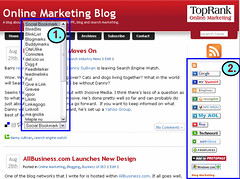
Screen Shot of 2 New Social Media Optimization Tools

The first tool is one we’ve received excellent comments on and it’s called the Social Bookmark Creator. In order to make it easy for readers to save a blog post or a web page for reading later or to aggregate resources using a social bookmark service, we’ve created a tool that allows you to add a social bookmark menu after each post or on a static web page.
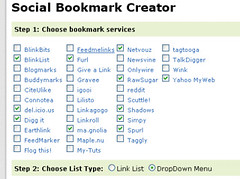
Social Bookmarks

What’s different about this tool from other social bookmarking tools and our own previous version is that the social bookmark links are presented in a drop down menu to save screen space.

The second tool is the RSS Button Maker. You can see the result of this tool by putting your cursor over the orange RSS icon at the upper right of your screen on this blog. A list of the top RSS readers folds out so you can subscribe using your favorite reader.
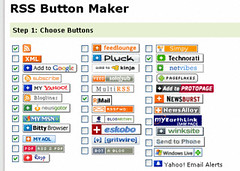
RSS Buttons

Both of these tools help conserve screen real estate and also help to socialize blogs.

We have other ideas in the works on how to enable the optimization of social media that we’re saving for our blog and SEO consulting clients, but will eventually make more of them available to all.

Thanks to Thomas for his work on these tools and please be sure to provide any feedback in the comments. These are new tools and will undoubtedly have a few rough edges, so we’re very interested in your thoughts.

Save to del.icio.us [StumbleUpon] [Google] [Facebook] [Twitter]             subscribe Subscribe to this Feed

Rate this Post: PoorSo SoOKGoodAwesome (2 votes, average: 3.50 out of 5)
Loading ... Loading ...

Related Posts You May Enjoy Reading:

  • I this tool is same as http://www.ifeedreaders.com/social-creator/

    what is difference i did not find.
  • hi

    thanks a lot thomas & Lee

    I am glad to help people like you
  • Hey Guys I really liked you cool tools and added them to my blog. Well done, and thanks for a great idea. Really simplified life:)
  • Very useful tools! I'd love to see a similar tool that would be useful for online shops, making buttons to post to "social shopping" sites. I'm not sure that's the generally accepted term, but I'm thinking of StyleHive, Wists, TheThingsIWant, and so on. I'm sure there are other sites as well.
  • Pete - I have sent you an email as the update is more than I wanted to explain in the comments. Shouldn't be to hard though.
  • how can I get the size of the RSS gif increased and centered and have the "subscribe" text below the gif bigger like your example is? tried playing around with the code a bit but haven't been able to do so yet.

    great tool though, will really help with your seo for your blog.
  • I am glad to help people like you ;)

    Hope you will solve it fast :)
  • Nick - I've joined the discussion on that thread to see if there is an issue or if it's just how it was implemented. :) Thanks for the heads up.
  • Thanks for the heads up Nick, we'll check that out.
  • Someone in my forum sais that the wordpress links are not working. Maybe you should check that :

    http://www.webdigity.com/index.php/topic,3908.0...
  • Thanks for the feedback Joe. I like the idea of "Save to" and will pass that on to Thomas. The typo will get fixed asap.
  • Thanks Lee. These are nice enough that I was able to incorporate them easily (I'm no programmer) into my Wordpress blog. I patched the RSS buttons into my theme's sidebar file and the social media links into the single page file. Viola!

    One catch, in the RSS buttons, the "Learn About Blog Optimization" link has the word "learn" misspelled. And I felt the need to change the social bookmark pull down menu label to simply, "Save to:".
  • Recommend you study html-tag "label" for checkboxes and radiobuttons in your forms.
  • Thanks guys, am glad you like the tools.
  • This is great! Thanks Thomas & Lee!
  • I've used your bookmark tools in the past on my blog and I am really looking forward to moving up to these new tools.

    Keep up the great work!
blog comments powered by Disqus
     Subscribe


TwitterCounter for @leeodden

Hosting sponsor: ReliaCloud Cloud Hosting